Who is this product best for?
- Home network upgrades
- Business network deployments
- ISP and installer projects
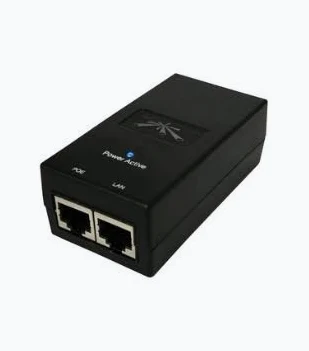
Works with compatible Ubiquiti UniFi, UISP or standard Ethernet networking equipment. Confirm controller, power and mounting requirements before purchase.
Check the product label or manufacturer datasheet for exact input voltage, PoE support and power adapter requirements.
The Ubiquiti 48V 0.5A PoE Adapter supplies power to a compatible network device through its Ethernet connection. It is a practical accessory for replacing an approved injector, keeping a correctly matched spare, or installing a supported radio or access point where a separate power socket beside the device would be inconvenient. Its purpose is straightforward: combine a network connection with the specified DC supply on the powered cable, while the upstream router or switch continues to handle network traffic.
Choose this product by the complete injector model and the requirements of the equipment receiving power. A voltage and current description alone does not identify every feature. Ubiquiti has supplied different Ethernet-speed versions within these adapter families, and an RJ45 plug fitting the socket does not establish electrical compatibility. For a reliable purchase, compare the powered-device label, the original adapter if available, the required powering method, and the full replacement SKU before placing the order.
Feature
Specification
Product
Ubiquiti PoE adapter
Nominal DC output
48V
Rated output current
0.5A
Nominal output capacity
24W
Connection arrangement
Data input and powered Ethernet output
Variant selection
Confirm POE-48-24W versus the corresponding Gigabit version
Installation
Protected indoor power location
Software
No adoption or software configuration for the injector itself
The injector sits between a network source and the compatible powered device. A normal Ethernet cable from a router or switch enters the data side. A second cable carries the data connection and the intended power supply toward the endpoint. This arrangement can simplify a small installation because the router or switch does not need to provide that particular powering method directly. It is especially useful when maintaining an existing device whose original injector has failed or gone missing.
The adapter does not create Wi-Fi, supply an internet subscription, allocate IP addresses, or manage users. Those tasks remain with the connected equipment. If an outdoor bridge is installed, its radios establish the wireless connection; the injector only provides the required electrical supply and data path. Understanding this role makes troubleshooting easier: a powered radio can still have a configuration problem, and a working internet router cannot compensate for an incompatible power source farther along the cable.
At its nominal rating, 48V multiplied by 0.5A corresponds to 24W of output capacity. This is a supply rating, not a statement that every connected device consumes 24W continuously. The endpoint draws according to its operating requirements within a correctly designed compatible system. The complete installation must still account for cable losses and the device manufacturer's supply requirements. Do not size a replacement only by comparing a typical consumption figure with the number printed on an adapter.
A 24V injector is not an automatic alternative to this 48V model. Some endpoints accept a documented input range, while others require a specific arrangement. Even where a voltage appears to fall within that range, polarity, powered pairs, current capacity, and PoE method need to match. Use the manufacturer's instructions for the exact endpoint. Increasing voltage or substituting a different injector because a cable run is unreliable is not a sound substitute for diagnosing the cabling and supply design.
The legacy POE-48-24W family includes a non-Gigabit version, while the corresponding model with a G suffix provides Gigabit Ethernet capability. Confirm the actual label rather than relying on a generic 48V 0.5A headline. A Gigabit radio connected through a slower injector cannot achieve a Gigabit wired connection through that injector. Conversely, buying the Gigabit variant does not upgrade a radio whose own Ethernet interface belongs to the 100Mbps class.
Assess the whole data path before selecting the variant. The source switch, both patch connections, installed cable, terminations, and endpoint all influence the negotiated link. A damaged pair can reduce the speed even where the injector is correctly specified. Record the Ethernet status during commissioning so there is a baseline for later maintenance. For business applications or a faster wireless link, preserving the intended wired interface is part of the power-accessory choice rather than a separate afterthought.
Treat passive powering and standards-based PoE as separate compatibility questions. Do not infer IEEE 802.3af, 802.3at, or 802.3bt support from a voltage printed in a product title. A standards-based device may depend on detection and negotiation that a passive injector does not provide. Equally, a legacy passive-PoE endpoint may need a different source from a modern PoE switch. The correct answer comes from the exact injector and endpoint documentation, not a broad claim that all PoE products work together.
When replacing equipment, photograph the original injector label and the powered device label before disconnecting anything. Record which socket carries the powered output and where its cable terminates. If several similar adapters are present, keep them associated with their own devices. That small preparation step prevents a working installation from being accidentally connected to a different voltage during servicing. Ask for compatibility confirmation when the original supply is unreadable or the endpoint model cannot be identified confidently.
For a small office or home network, a matched injector can power a supported access point without replacing an otherwise suitable Ethernet switch. For an installer maintaining a wireless customer connection, an approved spare can help isolate a suspected power fault. In each case the use is tied to a known endpoint. Avoid buying a miscellaneous collection of similar-looking injectors and treating them as interchangeable emergency parts, because electrical mistakes can create a larger problem than the original outage.
For a business with several sites, standardizing the spare-parts record can reduce repeat visits. Keep the device model, approved adapter SKU, cable destination, and commissioning result together. A branch technician can then identify the correct replacement before traveling. For a rooftop radio installation, position the mains-powered injector in a protected accessible location, with the outdoor cable routed and protected according to the radio's instructions. The outdoor suitability of the radio does not make its indoor power adapter weatherproof.
Use an Ethernet cable appropriate for the endpoint, route, and environment. Inspect the plugs for correct termination, full insertion, and strain relief. A cable may pass a basic continuity check yet still perform poorly under operating load or at its intended data rate. If the device starts on a short cable but fails on the installed run, investigate the complete cable path. Avoid hidden joins, crushed sections, and damaged connectors that make power and data problems intermittent.
Keep the complete Ethernet channel within the limits specified for the connected equipment and cabling system. The injector does not extend Ethernet distance or regenerate a weak data signal. Where the route is too long, redesign the network using suitable equipment rather than adding arbitrary cable. Route power equipment so connectors remain accessible for inspection and ordinary maintenance. Leave sufficient cable slack for service without creating loose loops that can be caught, pulled, or mistaken for unused connections.
Follow the grounding arrangement specified for the injector and the powered equipment. Where shielded cable, grounded connectors, or Ethernet surge protection form part of the installation instructions, preserve that arrangement through the entire route. Built-in protective components do not make a network immune to lightning or eliminate the need for an appropriate building installation. A mains outlet, cable entry, and outdoor radio should be considered parts of the same system rather than assessed independently.
Keep the adapter dry, ventilated, and protected from accidental handling. Do not leave it loose on a damp floor or seal it inside an improvised container that traps heat. Use a properly maintained power connection and secure the cable routing without placing strain on the sockets. If there is scorching, water ingress, a damaged mains lead, or unusual physical damage, isolate the equipment and have the fault assessed. Opening or modifying the adapter is not a normal configuration step.
1. Identify the endpoint. Read its full model number and power-input requirements. Compare them with the intended injector, including voltage, output capacity, powering method, polarity, and data capability. Complete this check before connecting either Ethernet cable to a powered output.
2. Confirm the adapter variant. Inspect the delivered label and match it to the ordered SKU. If the network requires Gigabit Ethernet, verify the specific Gigabit version rather than assuming that every adapter with the same voltage and current has that capability. Retain the label information in the installation record.
3. Prepare a protected power location. Place the adapter near a suitable mains supply and where both Ethernet connections can be serviced. Provide ventilation and stable support. If an outdoor endpoint is involved, keep its indoor injector protected and plan the outdoor cable route separately.
4. Disconnect power while arranging the wiring. Identify the LAN or data input and the PoE or powered output from their markings. Do not guess based on left or right socket position, since enclosure layouts can differ. Label both cables if the destination will not be obvious later.
5. Connect the data source. Run a known-good Ethernet cable from the intended router or switch LAN port to the injector's data input. Use the correct network port and avoid creating an additional path that accidentally loops the local network through another switch or bridge.
6. Connect the compatible endpoint. Run the second Ethernet cable from the injector's powered output to the endpoint's designated power-input Ethernet port. Ensure that the cable does not terminate at an ordinary laptop or an unverified device. Check the complete route before energizing the adapter.
7. Complete any required grounding and surge-protection connections. Follow the endpoint's installation requirements, especially where the cable leaves the building. Check connector seating and strain relief. Arrange outdoor cable entry and drip management so water cannot follow the cable into the indoor power area.
8. Connect mains power and observe startup. Allow the endpoint to complete its normal boot process. Check the endpoint indicators rather than relying on the injector alone to prove service. If startup is unstable, disconnect and investigate the supply and cable path instead of repeatedly reconnecting unidentified equipment.
9. Verify management and Ethernet status. Reach the powered device using its own supported management method. Confirm the negotiated wired speed, expected address, and relevant network settings. The injector itself does not need an IP address or adoption into a wireless controller to pass the intended connection.
10. Test the service under normal activity. Check local network access and internet access where required, then observe the endpoint during representative traffic. A successful startup is useful evidence, but it does not establish that a long cable remains stable during sustained operation or changing device load.
11. Document the finished installation. Record the injector model, endpoint model, cable route, outlet location, and tested Ethernet speed. Keep photographs of the labels and save the endpoint configuration where supported. Leave the powered cable clearly identified so future servicing does not introduce a wrong-voltage connection.
If the endpoint remains off, start with the mains source and cable connections, then verify the adapter against the endpoint requirements. Test with a short known-good Ethernet cable where practical. If a known approved spare restores operation, retain the failed part for assessment rather than returning it to the spare stock. If neither source works, investigate the endpoint and installed cabling before assuming that a second injector is also defective.
If the device powers up but no network traffic passes, check the data input, source switch port, cable termination, and endpoint configuration. Power reaching the device does not prove all Ethernet conductors and pairs are working correctly. If the speed is lower than expected, confirm the injector variant and the capabilities of every component. If internet access alone fails while local management works, investigate the router, DHCP, DNS, or upstream service separately from the injector.
A correctly matched adapter can preserve an existing network investment by replacing only the failed power accessory. It provides a compact way to connect a compatible endpoint to a non-PoE data source, and it keeps power equipment in an accessible position away from a difficult radio mounting point. A documented spare can shorten fault isolation. Choosing the appropriate Ethernet-speed variant also helps avoid an unnecessary wired bottleneck in a compatible installation.
This is a model-specific power accessory rather than a universal PoE solution. The wrong voltage, powering arrangement, or current rating can make it unsuitable even where the connectors match. It serves the intended individual connection rather than replacing a multiport managed PoE switch. It also depends on the mains supply and installed cable quality. An injector adds another component to maintain, so clear labeling and a suitable spare-parts record are valuable in larger deployments.
It provides the intended power arrangement on its individual output connection. The upstream switch remains a data source and does not gain powered output on its other ports. For several endpoints, compare a suitable multiport design and confirm that its powering method matches every device.
No. It can preserve the intended Ethernet connection when the correct data-capable version is used, but it does not increase the broadband subscription or radio capacity. A slower injector can restrict a faster endpoint, so variant selection matters even though the injector is not a speed-up device.
The injector itself does not require an SSID, administrator account, or controller adoption. The powered radio or access point may require its own configuration. Keep these tasks separate when following setup instructions, and do not reset a working endpoint merely because its supply is being replaced.
Do not assume that a passive cable splitter is an approved way to divide the output. Each endpoint needs a compatible electrical arrangement and sufficient capacity. Use equipment designed for the intended distribution method and check the complete power budget rather than adding unverified branches.
Provide clear photographs of the original injector and endpoint labels, the full device model, and the required Ethernet speed. Mention any long outdoor cable route or repeated restarting. These details help identify the correct accessory and distinguish a failed supply from a cabling or compatibility problem.
A spare injector is most useful when it is identified before the fault occurs. Keep the full SKU beside the device inventory, with the correct mains lead and a known-good short Ethernet cable. Mark the spare as tested and record which endpoint models it is approved to supply. This prevents an urgent service visit from becoming an experiment with similar-looking adapters. For multiple sites, include the cabinet or room location so a technician can find the correct supply without unplugging unrelated services.
When diagnosing an outage, distinguish a loss of power from a loss of network service. If the endpoint repeatedly restarts, note whether the behavior changes with a short cable, a verified supply, or a different mains outlet. If it remains powered but internet access fails, record whether local management and local network traffic still work. These observations help narrow the fault. Replacing a power accessory is appropriate when evidence points to it, while a damaged installed cable or upstream router issue needs its own correction.
For an order, specify the endpoint and required data rate rather than requesting only a generic PoE adapter. Confirm whether the quoted item includes the AC lead, whether its plug suits the installation, and whether it is a replacement-only accessory or a complete retail package. Ask for the exact variant on the invoice where variant selection matters. Keep the original injector until the replacement has been tested with the actual device, so any discrepancy can be resolved using the labels rather than memory.
A power injector does not provide battery backup. Where uninterrupted operation matters, include the upstream router, switch, injector, and endpoint in the backup-power plan. Keeping only the outdoor radio powered will not preserve internet access if the gateway or source switch has stopped. Test recovery after a normal planned power interruption and confirm that the endpoint returns to its expected configuration. Document any manual recovery steps needed by the wider network.
Order the Ubiquiti 48V 0.5A PoE Adapter from Ubiquity UniFi Kenya after confirming the exact SKU and endpoint compatibility. Request the appropriate Ethernet-speed version, check the included mains lead and local plug arrangement, and confirm warranty and delivery terms. For replacement work, share the existing labels before ordering. For a new installation, include the intended device model and cable plan so the complete supply arrangement can be checked together.
Compare the exact model first, then assess the complete alternative system. A shared brand, frequency, or connector does not establish compatibility. Different radio platforms, antenna arrangements, and power accessories must be checked separately before substituting equipment.
Ubiquiti 48V 0.5A adapter at Orbitlink; Ubiquiti 48V Gigabit adapter variant; Ubiquiti 24V adapter at Orbitlink
UBNT 24V 12W adapter at Tawa; 48V Gigabit injector alternative at Tawa; MikroTik RBGPOE injector alternative
MikroTik RBPOE injector alternative; MikroTik RBGPOE at Tawa; PoE accessory alternatives at Reisen
Ubiquiti POE-24-12W-G exact Gigabit variant; Ubiquiti PoE adapter range; MikroTik PoE conversion alternative
Reviews are not available yet for this product.
Ubiquiti PoE Adapter 48V 0.5A Price in Kenya is currently listed as available. Stock can change, so confirm availability before placing a large order.
The current listed price is KSh 2,500.00. Prices are generated from the product catalogue and may change when inventory is updated.
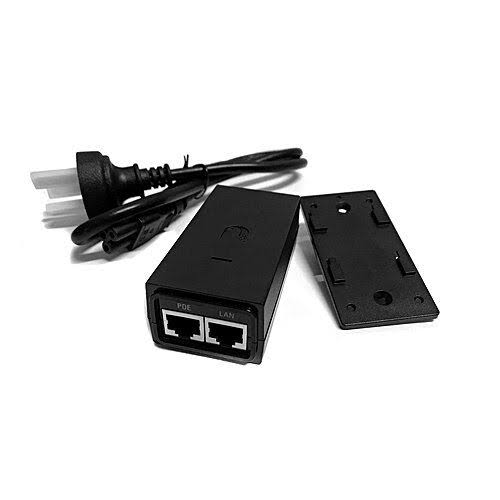
Buy Ubiquiti 24V 0.5A PoE Adapter in Kenya. Power compatible passive-PoE devices and choose the correct Fast Ethernet or Gigabit ver