Who is this product best for?
- UniFi network control
- Business internet gateways
- VPN and security gateway deployments
Works with compatible Ubiquiti UniFi, UISP or standard Ethernet networking equipment. Confirm controller, power and mounting requirements before purchase.
Check the product label or manufacturer datasheet for exact input voltage, PoE support and power adapter requirements.
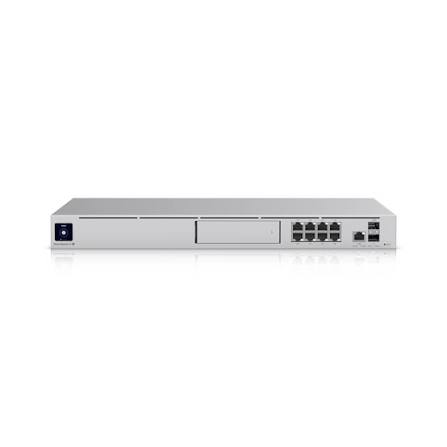
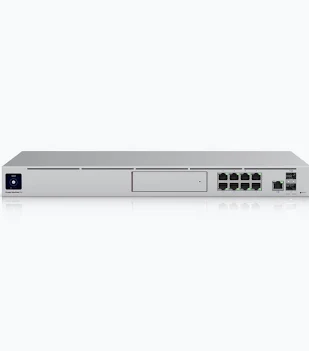
The Ubiquiti Dream Machine Special Edition UDM-SE is a UniFi Cloud Gateway for a network that needs routing, security, and a central place to administer supported UniFi equipment. It connects the local installation to an upstream internet service and supports an organized design for staff, guests, and other device groups. Select it around the actual ISP handoff, enabled security workload, application requirements, and local port layout. The correct gateway is the one that fits the complete site rather than the one with the most familiar product name.
For an office, school, hotel, retail business, or capable home network in Kenya, the gateway can become the point where addressing, access rules, and internet connectivity are coordinated. It remains part of a wider installation. Access points supply wireless coverage, switches provide the required local connections, and the ISP supplies the internet service. Plan those parts together so the gateway is supported by suitable cabling, endpoint power, and management ownership from the outset.
Feature
Specification
Model
UDM-SE
Ethernet layout
8 × 1GbE LAN; 1 × 2.5GbE RJ45; 2 × 10G SFP+
Published IDS/IPS throughput
3.5Gbps under manufacturer test conditions
Recording storage arrangement
1 × 3.5-inch HDD bay; drive selected separately
PoE output
6 PoE ports and 2 PoE+ ports; 180W total budget
Form factor
1U rackmount
Built-in Wi-Fi access point
No
UniFi application scope
Network and supported UniFi applications
Primary role
Network gateway and local UniFi management console
The Special Edition adds integrated PoE output to its local Gigabit switch ports. The 6 PoE and 2 PoE+ connections have different power classes, so access-point or camera placement must follow the actual port map. The shared power budget is not a promise that every endpoint can draw its individual maximum at the same time. It also has a recording drive bay; storage selection remains a separate part of the system.
Choose the Special Edition when a rackmount gateway with some directly powered endpoints fits the project. A separate access switch may still be useful for port growth, different uplink needs, or a larger power requirement. Do not treat its Gigabit LAN ports as 2.5GbE merely because the RJ45 WAN interface supports a faster link. Map the endpoint and uplink requirements before comparing it with the Pro or Pro Max.
The WAN connection links the gateway to the service-provider equipment. Confirm whether the service uses DHCP, PPPoE, static addressing, a required VLAN, or another documented handoff. A router cannot infer every provider requirement from the cable alone. Keep the existing connection details and any provider-supplied equipment configuration available during installation. If the old router is also providing other services, identify them before replacing it so the internet change does not unexpectedly interrupt phones, cameras, or remote access.
Decide where routing should occur. If an upstream modem or router remains in router mode, the installation may have an additional translation layer. That can be acceptable for some uses but can affect inbound connections and troubleshooting. Where bridge or passthrough operation is appropriate, arrange it using the provider's supported method. Do not change the upstream device blindly; first establish the intended address plan, remote-access requirements, and a recovery route if the new gateway does not receive service.
Use the port layout to plan the local handoff. A faster WAN socket does not turn every LAN port into the same interface speed, and a fast uplink does not upgrade a slower downstream switch. Count local connections, required uplinks, and any secondary service before ordering. If most devices connect through an access switch, assess that common connection carefully. Many otherwise fast endpoints can share the same constrained route toward the gateway or a local server.
The published inspection figure is a performance reference rather than a universal speed guarantee. Packet mix, enabled services, configuration, concurrent applications, VPN use, and connected equipment affect the result. Compare the required service while the features you intend to use are active. Test local forwarding and the ISP connection separately when diagnosing performance. A low internet test result may come from the subscription or test destination rather than the gateway, while an idle test may miss the behavior of a busy production site.
The gateway hosts its supported UniFi management environment, allowing the installation to be organized around a site and its adopted equipment. Establish the rightful owner and administrator access before commissioning. Where an installer performs setup, agree on handover and recovery access so the business can maintain its own network afterward. Keep account protection enabled and use appropriate individual administrative access instead of circulating a shared personal login among everyone who may someday support the site.
Name devices and networks so the management view reflects the premises. A location-based switch name, a recognizable access-point label, and a clear WAN description make alerts easier to interpret. Maintain configuration backups and retain the information needed to restore the system to compatible hardware. A backup that nobody can locate or associate with the correct site offers limited practical value. Review software changes against the operating requirements before upgrading a working business installation.
Create separate networks where the business needs different access rights or traffic treatment. Staff equipment, guests, cameras, and management devices are common planning groups, but their exact separation should follow the site. Define addressing, DHCP, DNS, and permitted communication for each group. A VLAN ID alone is not a complete security design. The gateway, switches, access points, and any third-party equipment all need to handle the intended traffic consistently across the full path.
For example, guests may need internet access without access to staff computers, while a recording workstation may need controlled access to cameras. Translate those requirements into explicit policy and test them with representative devices. Do not rely only on a network name that says Guest or CCTV. Check both the communication that should work and the communication that should be blocked. Preserve administration access while changing segmentation so a security improvement does not accidentally remove the operator's recovery path.
Use the gateway's security functions as part of an understandable configuration. Identify which services need inbound exposure, which users need remote access, and which local networks require isolation. Avoid broad exceptions created simply to make an application work during setup. Record the reason for an exception and revisit temporary rules before handover. A maintainable policy is easier to audit and troubleshoot than a long list of unexplained changes accumulated during urgent support calls.
Inspection and traffic visibility can support administration, but they do not replace secure endpoints, current software, backups, and appropriate user access. Treat alerts as information that needs context rather than proof that every event is a successful attack or every quiet period is safe. Review what the site actually needs and test the effect of enabled services on important applications. Features that depend on a software release, optional service, or subscription should be assessed in that exact deployment.
A supported VPN arrangement can connect authorized remote users or link separate sites, but it needs an explicit access policy. Decide who should reach which resources and whether the connection is for administration, ordinary work, or a defined application. Confirm the ISP's addressing and carrier-grade NAT conditions before promising inbound access. A public-looking address shown by an online test does not prove that the gateway itself holds a directly reachable public address.
For multiple offices, document address ranges before connecting sites so overlapping subnets do not create routing problems. Check the intended VPN method and software support at both ends, then test the actual applications. Keep authentication and recovery under the business's control. A tunnel showing as connected is only the first check; permitted resources, DNS resolution, and traffic policy still need verification. Retain a clear distinction between ordinary remote users and administrators who can change the infrastructure.
Where the design uses an additional internet service, confirm the supported port assignment and desired failover behavior. Decide which services should continue during a primary outage and whether an alternate service has data limits or a different public address. Test a planned outage rather than assuming that a second connected cable proves failover. Existing sessions may behave differently when the path changes, so assess important calls, applications, and remote-access connections under realistic conditions.
Power resilience includes the complete service chain. Keeping the gateway on a UPS does not preserve internet access if the ISP equipment, access switch, or wireless access points lose power. Include those components and any required recording hardware in the backup plan. Estimate runtime from the actual installation load and verify recovery after a controlled interruption. Keep the equipment protected and accessible so a simple power or cabling fault can be investigated without dismantling the cabinet.
If the deployment will use supported recording applications, specify storage deliberately. Confirm the exact gateway variant, compatible recording media, retention requirement, and expected camera load. An empty bay or a no-storage variant is not a recording archive. Calculate retention using the actual camera settings and recording policy, and distinguish recording media from the system storage used by the console. Do not promise a fixed number of recording days from capacity alone without those inputs.
Plan the recording system's power and network path alongside the gateway. Cameras need compatible power and a route to the recording application, while authorized users need the intended viewing access. Confirm application and camera compatibility rather than assuming every camera or device in the same brand ecosystem is supported identically. Storage redundancy, where configured, is a separate consideration from exported footage and configuration backups; a second drive does not replace a complete recovery plan.
1. Record the existing service. Save the current router configuration where supported and note WAN settings, local subnets, DHCP reservations, VLANs, VPNs, and essential applications. Identify the ISP equipment and preserve a rollback plan. Arrange a suitable change period if replacing a working business gateway.
2. Confirm the package and install the hardware. Verify the exact model and storage variant. Use the approved supply and installation accessories. Provide ventilation and connector clearance. For a rack installation, secure the chassis correctly; for a compact desktop model, choose a protected stable position with accessible power and Ethernet connections.
3. Connect the ISP handoff to the designated WAN interface. Use a suitable cable or supported optical arrangement and confirm the expected interface rate. Retain the existing provider equipment until its role is understood. Avoid connecting the new gateway's LAN into the old LAN without a plan for conflicting DHCP services and address ranges.
4. Begin the supported UniFi setup process. Use the UniFi application or local setup method available for the model and software. Establish the business's administrator ownership, protect the account, and name the site. Confirm the gateway identity before adopting other devices or restoring information intended for a different installation.
5. Enter the WAN requirements. Configure DHCP, PPPoE, static parameters, or required VLAN information according to the ISP handoff. Verify address assignment, gateway reachability, and DNS. If service does not establish, isolate the provider connection and cable status before making unrelated changes to local firewall or Wi-Fi settings.
6. Set the primary LAN and DHCP design. Choose an address range that does not conflict with the upstream network or intended remote sites. Review reservations and essential devices before migration. Move a test client first and confirm its address, gateway, DNS, and access to the services it should use.
7. Create additional networks and access policy. Define VLANs, addressing, DHCP, and the required communication rules. Keep an administrative recovery path. Test an example device on each network before migrating the full endpoint group. Do not assume that creating a second network name establishes complete isolation across all connected switches and access points.
8. Connect and adopt supported UniFi switches and access points. Confirm their management path and power source. Configure port networks and Wi-Fi assignments to match the gateway design. A third-party switch may need separate configuration; it is not automatically provisioned by appearing on the same Ethernet network.
9. Assign compatible directly powered devices to suitable ports and review the shared PoE allowance. Keep the PoE and PoE+ port groups distinct in the cable plan. Check every endpoint's power requirement and do not connect legacy passive equipment on the assumption that all powered Ethernet is interchangeable.
10. Configure the intended security and remote-access services. Apply only the necessary rules and supported VPN settings, and test important applications with those features enabled. If adding a backup WAN, verify its requirements and run a controlled failover test. Record any expected limitations before the network is handed over.
11. Prepare recording storage if required. Confirm the selected media and supported installation procedure, then configure the intended recording application and compatible cameras. Check viewing permissions and retention settings. Validate actual recording and playback rather than treating a detected drive as proof that the surveillance service is complete.
12. Complete acceptance and handover. Test local resources, internet access, guest restrictions, remote access, and important applications using representative clients. Review backups, ownership, labels, and recovery details. Keep the old configuration until the replacement passes the agreed checks, then document the final service path and support process.
If the WAN is disconnected, inspect the physical handoff and expected interface rate before changing security settings. If it has an address but no service, verify the provider parameters, gateway path, and DNS. If only a particular client group fails, compare its address and VLAN assignment across the gateway, switch, and access point. Work from a known-good test client and change 1 variable at a time so the cause remains identifiable.
If adoption fails, check the management network, application compatibility, and previous site ownership. If throughput is lower than expected, separate a wired local test from a wireless or internet test and review the features enabled during measurement. If a migration breaks remote access, compare the public addressing, NAT arrangement, firewall rules, and VPN route. Repeated resets usually remove useful evidence; preserve configuration and observations before deciding that a factory reset is appropriate.
A gateway and management console in the same device can simplify a planned UniFi installation. A consistent site view helps organize supported switches and access points, while a deliberate addressing and security design makes a growing network easier to support. The specific hardware layout allows the WAN, local handoff, and application requirements to be assessed together. Its practical value is strongest when configuration ownership, backups, and the supporting network are kept under clear control.
This is not a complete internet and Wi-Fi installation by itself. It needs an ISP service, suitable local distribution, and separate wireless access points. Power and recording capabilities differ between models, so a similar product name is not an acceptable substitute without checking the details. Security performance depends on the workload, and application requirements can change the hardware choice. Include switches, power accessories, optics, storage, mounting, and configuration work in the complete project budget.
No. Plan suitable access points and place them around the actual rooms and user demand. The gateway manages the intended network role, while the access points supply wireless coverage. Their Ethernet and power requirements must be included even if the gateway is installed in a convenient central cabinet.
Appropriate standard Ethernet connections can work with third-party switching equipment. Management and VLAN configuration may need to be performed separately on that equipment. Confirm the whole traffic path and do not assume the UniFi application automatically applies settings to every switch connected to the gateway.
No. The provider continues to supply the contracted service. A suitable gateway can address a hardware or configuration limitation in the local installation, but it does not increase the purchased allocation. Test the provider connection, local wiring, and wireless coverage separately when deciding where an upgrade is needed.
Provide the ISP handoff, required services, approximate active-device load, existing equipment, and whether recording or other applications are needed. Include port speed, endpoint power, storage, and installation requirements. For replacement work, add the current configuration and an acceptable migration window so the change can be planned around business continuity.
Choose the Ubiquiti Dream Machine Special Edition UDM-SE from Ubiquity UniFi Kenya after matching the ISP handoff, local interfaces, security workload, and application plan. Confirm the exact model and storage package, warranty terms, required accessories, and delivery arrangements. For a new network, include switches, access points, cabling, and power equipment in the request. For a replacement, share the existing setup so compatibility and migration can be assessed before equipment is dispatched.
Compare the matching UniFi model first. The MikroTik links below are alternative routing platforms with different management and application arrangements; they do not replace UniFi console hosting automatically. Assess the complete network and management design before changing platforms.
UniFi Dream Machine Pro Max at Reisen; UniFi Dream Machine Pro at Reisen; MikroTik RB4011 routing alternative at Orbitlink
MikroTik RB5009 routing alternative at Orbitlink; MikroTik L009 wired routing alternative at Orbitlink; MikroTik L009 wireless routing alternative at Orbitlink
MikroTik RB4011 at MikroTik Kenya; MikroTik L009UiGS-RM alternative; MikroTik RB5009UG+S+IN alternative
MikroTik CCR2004-16G-2S+ rackmount alternative; MikroTik RB1100AHx4 rackmount alternative at Tawa; MikroTik L009UiGS-RM at Tawa
Ubiquiti Dream Machine Pro Max; Ubiquiti Dream Machine Pro; Ubiquiti Cloud Gateway Max
Reviews are not available yet for this product.
Ubiquiti Dream Machine Special Edition Price in Kenya is currently listed as available. Stock can change, so confirm availability before placing a large order.
The current listed price is KSh 95,000.00. Prices are generated from the product catalogue and may change when inventory is updated.
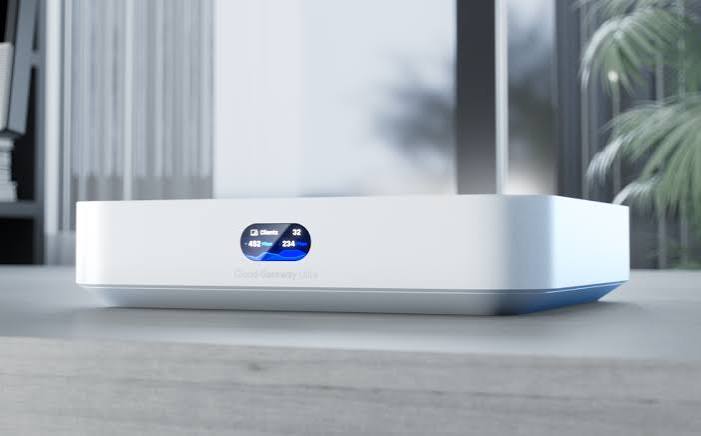
Buy Ubiquiti Cloud Gateway Ultra in Kenya. Manage a UniFi network with compact routing, security features, a 2.5GbE WAN, and Gigabit
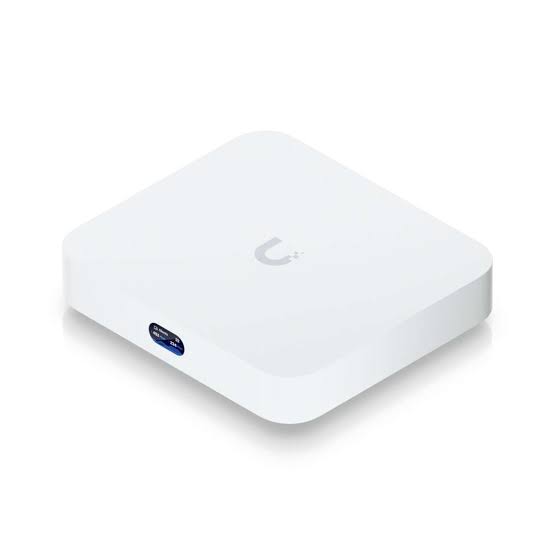
Buy Ubiquiti Cloud Gateway Max in Kenya. Get compact UniFi routing, five 2.5GbE ports, security features, and selectable recording s
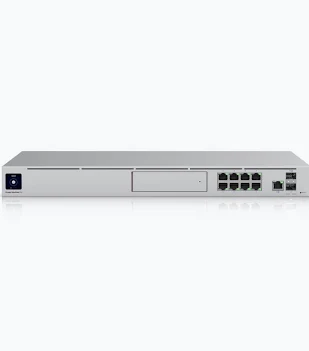
Buy Ubiquiti Dream Machine Pro in Kenya. Manage a UniFi network with a rackmount security gateway, 10G SFP+ interfaces, and recordin
Buy Ubiquiti Dream Machine Pro Max in Kenya. Get a rackmount UniFi gateway with 2.5GbE WAN, 10G interfaces, and dual recording-drive