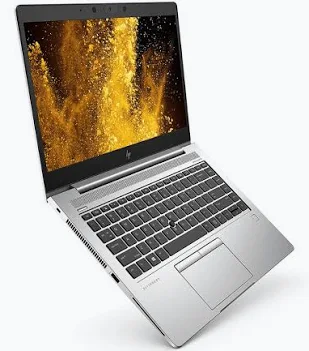
HP EliteBook 840 G6 Business Laptop
The HP EliteBook 840 G6 is a 14-inch business laptop suited to office productivity, studying, administration, and everyday professional work.
Its business-oriented connection options make it practical for users working with external monitors, wired networks, keyboards, and other peripherals. It can serve as a portable workstation for documents, spreadsheets, email, browser-based systems, and online meetings.
The EliteBook 840 G6 was supplied in multiple configurations. Confirm the processor, RAM, SSD, display, operating system, battery condition, and accessories for the specific unit before purchase.
Key Specification
FeatureSpecification or Purchase CheckProduct familyHP EliteBook 840 G6Display size14-inchProcessorConfiguration-dependentRAMConfirm installed capacityMemory layout2 SODIMM slotsStorageConfirm installed drive type and capacityUSB-A2 × USB 3.1 Gen 1USB-CThunderbolt-capable connectionDisplay outputHDMI 1.4bWired networkRJ45 EthernetAudioHeadphone/microphone combination connectionTouchscreenConfiguration-dependentConditionConfirm new, used, or refurbished status
HP’s documentation lists multiple hardware options, so specifications from 1 configuration should not be applied to every 840 G6. hp.com
Features and Benefits
- Practical office connections: Connect common peripherals and an external display without building the workstation around wireless accessories.
- Portable working format: The 14-inch size suits users moving between desks, meetings, and home.
- Wired network access: Useful for office connectivity and network troubleshooting.
- Configurable purchase options: Select a unit with appropriate memory and storage for the intended applications.
For office connectivity, explore the internal UniFi switch range and Ubiquiti access points.
What to Check Before Buying
- Confirm the exact processor model and installed memory.
- Verify SSD capacity and health.
- Check display resolution, brightness, and touch capability.
- Inspect the keyboard, hinges, ports, and charger.
- Request a battery-health assessment for a used or refurbished unit.
- Confirm the installed operating system, activation, and warranty terms.
How to Set It Up
- Inspect the laptop. Check the enclosure, display, keyboard, charger, and ports.
- Connect the correct charger. Confirm stable charging before continuing.
- Verify the configuration. Check system information against the agreed specification.
- Complete operating-system setup. Configure the account, region, and privacy preferences.
- Install updates. Apply supported operating-system, driver, and firmware updates using official channels.
- Configure connectivity. Test Wi-Fi and Ethernet.
- Install required applications. Add licensed productivity, communication, and business software.
- Set security and backups. Configure account protection and a suitable backup destination.
- Test working equipment. Check the webcam, microphone, speakers, external display, and peripherals.
- Review battery performance. Assess practical runtime under the intended workload.
Advantages
- Useful business connection options.
- Portable 14-inch format.
- Suitable for routine productivity.
- Serviceable memory layout.
Disadvantages
- Configuration varies between units.
- Older hardware platform.
- Used-unit battery and cosmetic condition require inspection.
- Suitability for demanding graphics work depends on the exact configuration.
FAQs
Is every EliteBook 840 G6 a touchscreen?
No. Confirm the supplied display.
Does it always include the same RAM and SSD?
No. Capacities vary.
Why is a refurbished unit’s battery runtime different from another laptop?
Battery wear, configuration, settings, and workload affect runtime.
Compare Related Business Laptops
- Start with the EliteBook 840 G6 at Reisen SEO, then compare the 840 G5 Core i5 and 840 G5 Core i7.
- For other generations, explore the 840 G9, 840 G4, and 840 G1.
- For alternative business formats, compare the 830 G5, 820 G4, and 820 G3.
- For other EliteBook configurations, see the 745 G6, 755 Ryzen 7 Pro, and 1030 G2 x360.
Choose an HP EliteBook 840 G6 configuration that matches your applications, mobility needs, and preferred working setup.